# CEObjectListItemRenderer
The component CEObjectListItemRenderer represents a baseBean as an object renderer in the list component.
# Properties
HTMLElementBaseComponent
Element tag:
cm4ap-ceobject-list-item-renderer
# Parameter
The parameters must be set via attribute itemRendererProperties of actor ListItemRendererFactory.
| Name | Type | Description |
|---|---|---|
| extendedContent | subpanel renderer | Activates expandable panels next to the list entries with additional content. More details and config guide |
| module | string | Defines the module from which the renderer configuration is loaded. |
| rendererName | string | Name of the renderer that will be loaded for the dataset display. |
# Extendable Lists
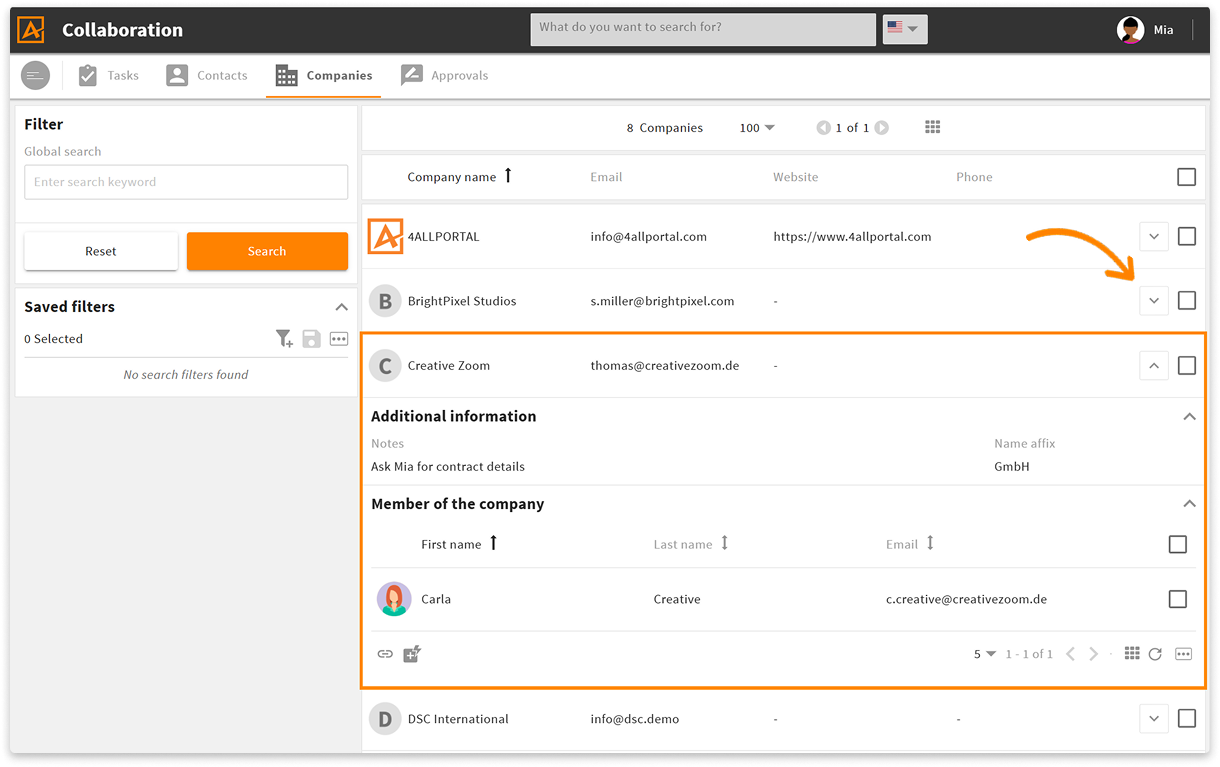
Via parameter extendedContent, you can extend a list with additional information panels (e.g., further metadata or related objects). As soon as there is content for parameter extendedContent, an 'Expand' button will automatically show next to each list element. Users can open the additional content for a list entry without leaving the current view.
# Supported Content Types
Use attribute type to define the content displayed in the expandable panel. If you add more than one content, a new panel is created for each separate content.
We support three content types:
| Name | Type | Description |
|---|---|---|
| renderer | string | Add the name of a simple renderer here. Example: additionalinformation will refer to renderer simple/additionalinformation of the current module (e.g. account). |
| subpanel | Add the information of a layout here.
|
# Example
In the following example, we add a simple renderer and a subpanel to module Companies (account) via a layout change of layout main:
<changes>
  <change xpath="//actor[@id='mainSearchGridFactory']/parameter" type="add">
    <entry class="map" key="itemRendererProperties">
      <entry key="extendedContent" class="array">
        <value class="map">
          <entry key="type">renderer</entry>
          <entry key="defaultOpen" class="boolean">true</entry>
          <entry key="renderer">additionalinformation</entry>
        </value>
        <value class="map">
          <entry key="type">subpanel</entry>
          <entry key="defaultOpen" class="boolean">true</entry>
          <entry key="module">contact</entry>
          <entry key="parameter" class="map">
            <entry key="subpanelTitle">L-ACCOUNT-ACCOUNT_CONTACT-SUBPANEL-TITLE</entry>
            <entry key="relationName">account_contact</entry>
          </entry>
        </value>
      </entry>
    </entry>
  </change>
</changes>
Result in the GUI: