
# Typeahead Index
# How Does the Typeahead Functionality Work?
The typeahead or autocomplete functionality provides suggestions for text and reference fields. As soon as a user starts entering text, relevant suggestions show automatically. This helps to tag assets with metadata more consistent and quickly, and to find only relevant search terms or references.
- Configuration: The typeahead functionality may be enabled in any field renderer for field types "text" or "reference". It can be configured in both metadata and search renderers.
- Database Index: The suggestions delivered require an index in the database. It stores and offers all values ever added to the defined field(s) and grows with each new value entered by users (if not restricted).
- Multiple fields: An index can consider only one field or more fields (e.g., fields "filename" and "keywords" in a search renderer "General search").
- Index sorting: The index entries are sorted by creation date (in the database) or alphabetically (in the GUI, if not disabled).
- Index storage: In your file system, an index is stored as
.4apindexfile in foldermodules/<module_name>/index/<index_name>.
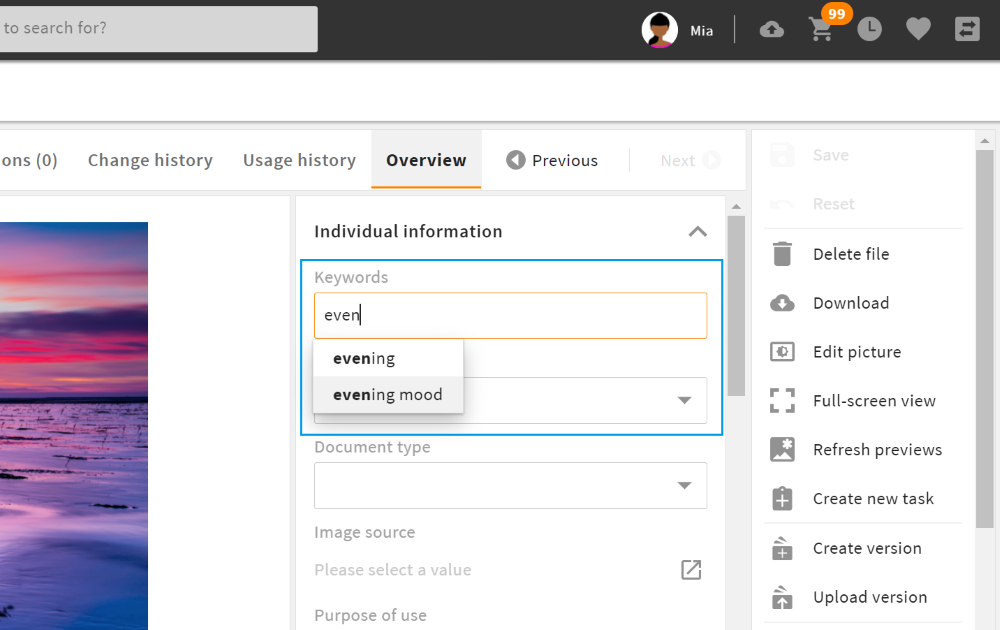
typeahead in a metadata renderer
Further Information
# Typeahead Configuration
To enable typeahead for a field, the following configuration is required:
- Create a typeahead index for the required field(s).
- Enable typeahead in the field renderer of your desired metadata or search renderer.
The configuration and processing of text/metadata and reference differs. Please note the two configuration guides and processing differences:
# Configuration for Text Fields
# 1. Create a Metadata Index
Create a new typeahead index in admin snap-in "Typeahead index" in the Module configurations of the corresponding module, e.g. Module configurations/Files/Typeahead index:
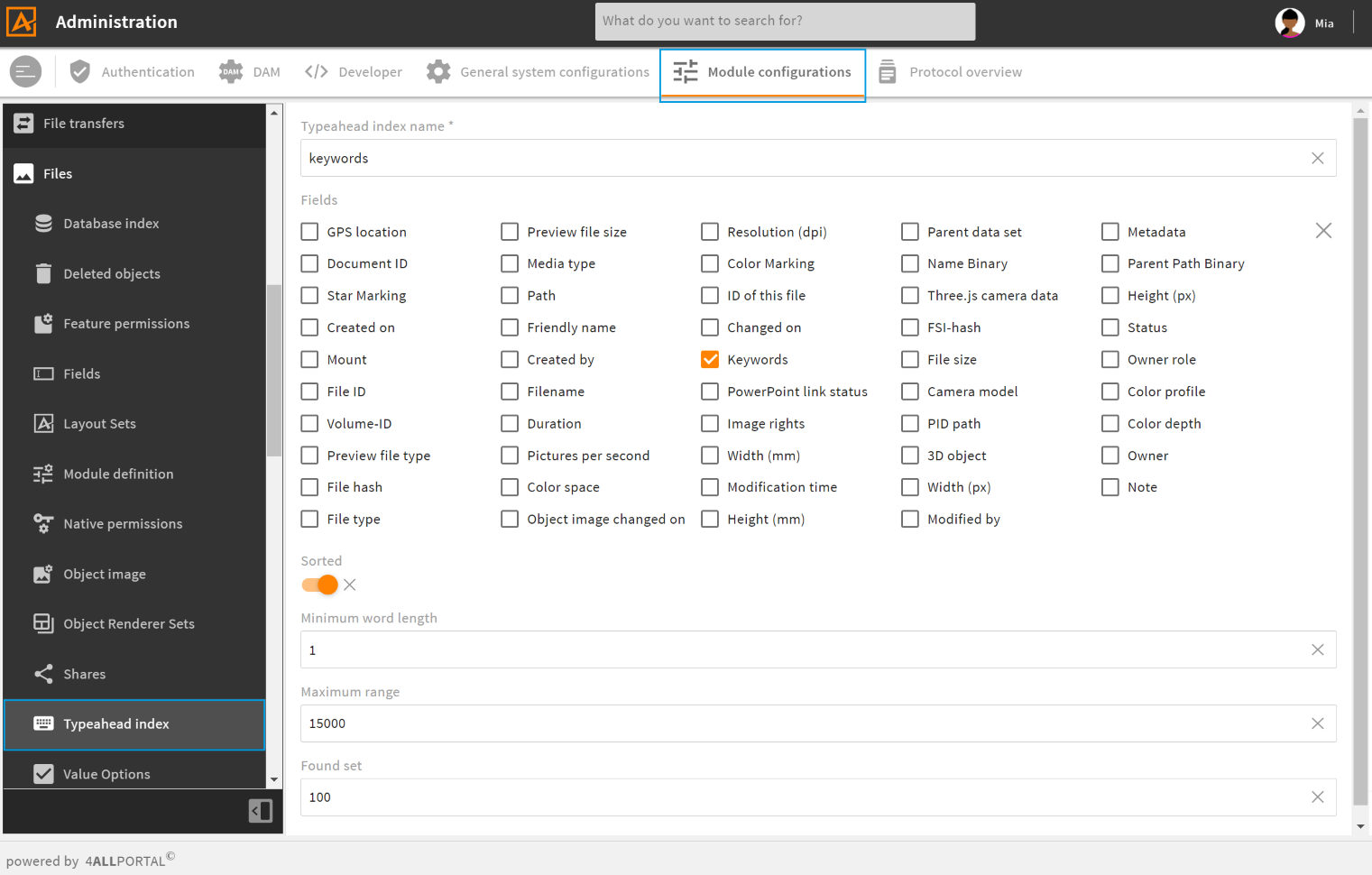
Create view
| Name | Description |
|---|---|
| Typeahead index name | The name needs for be unique for this module. Only lower case letters and underscore _ are supported. |
| Fields | Select the metadata field(s) that should be indexed. |
| Sorted ordered | Enable, if you want the suggestion list for this field to be sorted alphabetically in the GUI. Please note: Enabling will slow down the suggestion process. Please note: "Sorted" will be ignored for type reference. |
| Minimum word length min_word_length | Defines the minimum number of letters required for the suggestions to start. Please note: The smaller, the slower (more details). |
| Maximum range max_scope | Defines the maximum number of index entries searched and taken into account for suggestions. Please note: The larger, the slower (more details). |
| Found set count | Defines the maximum number of entries delivered as suggestions. Please note: The larger, the slower. |
# 2. Configure Text Field Renderer
In your metadata renderer or search renderer, look for the text field you need the typeahead functionality for.
- Add field renderer attribute
visual_typeand set it toauto_complete. - Add tag
<typeahead>and enter the corresponding typeahead index name. In tag<typeahead>, you have the following configuration options:
| Name | Value/Type | Description |
|---|---|---|
| enabled | false (default)true | Enables the typeahead functionality. |
| restrict_values | false (default)true | Prevents the input of values that are not suggested. This prevents typos in the text renderer. |
| index_name | name of the typeahead index (string) | For a typeahead request, this index is used to return its specific results. |
Further Information
# Configuration for Reference Fields
# 1. Create a Reference Index
For the typeahead configuration of a reference field, the index name must be "reference". In most default modules, this index is already part of the standard configuration and does not have to be created manually. The configuration differs slightly: "Sorted" will be ignored for type reference.
Only for custom modules, you need to create module index reference.4apindex like described above (details).
Please note: There can only be one reference.4apindex per module.
# 2. Configure Reference Field Renderer
In your metadata renderer or search renderer, make sure your field renderer is set to type "Reference". For this type, visual_type: bubble (and therefore, the typeahead functionality) is the default. This information does not need to be added extra to the field renderer.
In the field renderer attributes, set entry modules to the module you need your reference from, e.g.:
  <field_renderer_attributes>
    <entry class="string[]">modules</entry>
        <value class="string">contact</value>
The correct reference.4apindex for typeahead is then taken from that module automatically.
Further Information
# Examples: Metadata and Reference Fields
Metadata field "Keywords" with typeahead in a metadata renderer:
<field_renderer>
    <label>L-FILE-KEYWORDS</label>
    <type>Text</type>
    <colspan>1</colspan>
    <rowspan>1</rowspan>
    <width></width>
    <height></height>
    <disabled>false</disabled>
    <read_only_type>multi_line</read_only_type>
    <field_renderer_attributes>
        <entry class="string" key="visual_type">auto_complete</entry>
    </field_renderer_attributes>
    <typeahead>
        <enabled>true</enabled>
        <restrict_values>false</restrict_values>
        <index_name>keywords</index_name>
    </typeahead>
    <read_only>false</read_only>
    <hide_if_empty>false</hide_if_empty>
    <field>
        <name>keywords</name>
        <type>CEVarcharList</type>
    </field>
</field_renderer>
Result in the GUI:
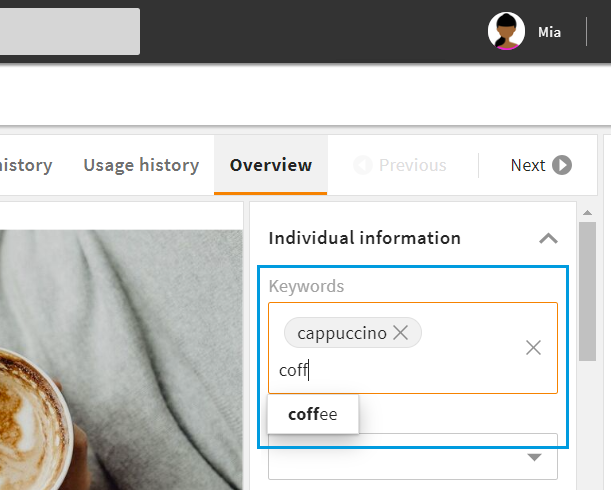
Reference field "Contact" with typeahead in a search renderer:
<field_renderer>
    <type>Reference</type>
    <placeholder>L-FILE-CONTACT-PROMPT</placeholder>
    <comparator>IN</comparator>
    <operator>AND</operator>
    <field_renderer_attributes>
      <entry class="string[]">modules</entry>
        <value class="string">contact</value>
      <entry key="show_image" class="boolean">true</entry>
      <entry key="image_type" class="string">module_icon</entry>
    </field_renderer_attributes>
    <search_fields>
      <search_field>
        <name>contact</name>
      </search_field>
    </search_fields>
</field_renderer>
Result in the GUI:
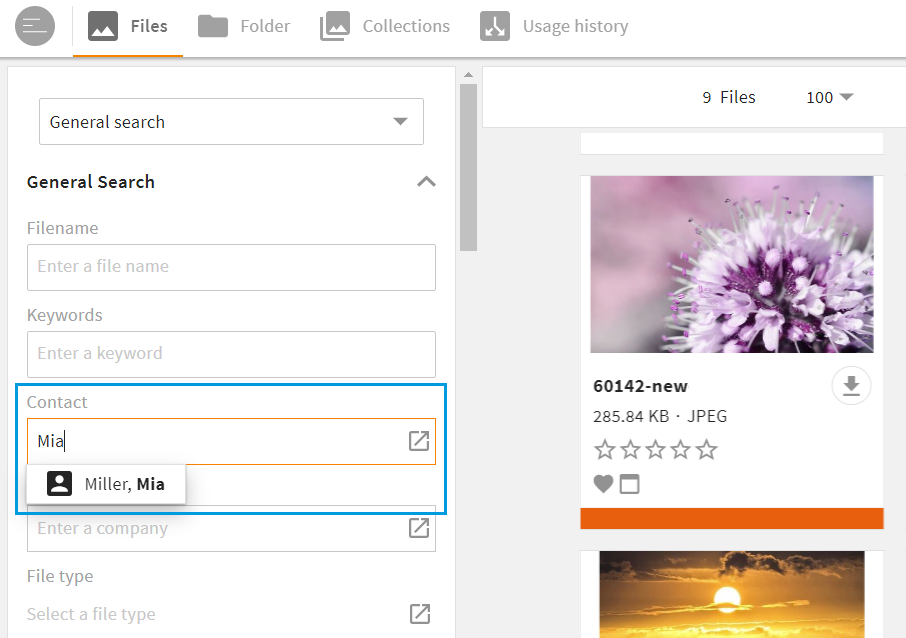
# Database Specifications and Limits
# Minimum Word Length
min_word_length only shows from how many characters the typeahead search is executed. It has no effect on full text indexing. For performance reasons, the database only considers terms from a certain word length for a full text search. Often only from a length of 3 characters (this definition can differ depending on the database).
If an index contains a lot of entries, we suggest to increase the minimum word length. This limits the suggestions to the most relevant index entries.
# Max_Scope
With parameter max_scope, you can optimize your database. The larger, the slower. The smaller, the fewer results.
The default max_scope is 1000, the maximum value is 15.000. We recommend the default 1000.
# Stopwords
Note that depending on the database configuration, some words ("stopwords") will not be considered in a typeahaed. They will not be searched for or suggested, e.g. "for" or "will". This means, if an entry in your index starts with database stopwords "for" or "will", e.g., "formula" or "William", they will not be suggested.
For example, the MySQL stopword list contains the following words:
{ stopwords=[a, about, an, are, as, at, be, by, com, de, en, for, from, how, i, in, is, it, la, of, on, or, that, the, this, to, und, was, what, when, where, who, will, with, www] }
Stopword Configuration
You can configure the stopword list in your database settings and add/remove single stopwords. You can also disable the whole list.
# Dimensions
In multidimensional fields, all values are indexed regardless of their dimension.
# Search Logic
As soon as punctuation marks appear in a search query, the so-called phrase search is performed. Without punctuation marks, the wildcard search is performed.
# Technical Functionality
# Metadata Index Specifics
Once at least one metadata index has been configured in the system, Core Engine method typeahead_metadata is automatically enabled.
# Database
If a typeahead index was configured correctly, the following tables will be created in the database:
- <module_name>_iv (iv = index value)
    CREATE TABLE `<module_name>_iv` (
       `hash` bigint(20) NOT NULL,
       `value` text NOT NULL,
       `value_re` text NOT NULL,
       PRIMARY KEY (`hash`),
       FULLTEXT `<module_name>_value_FTI` (`value`)
       FULLTEXT KEY `<module_name>_value_re_FTI` (`value_re`)
    ) ENGINE=`InnoDB`;
| Name | Description |
|---|---|
| hash | xxhash from value |
| value | fulltext |
| value_re | recurring order, fulltext |
- <module_name>_<index_name>_im (im = index mapping)
Mapping table between objects from the module and values.
    CREATE TABLE `<module_name>_<index_name>_im` (
       `object_id` char(36) NOT NULL,
       `field` varchar(28) NOT NULL,
       `hash` bigint(20) NOT NULL,
       PRIMARY KEY (`object_id`,`field`,`token_hash`),
       KEY `<module_name>_<index_name>_im_H` (`hash`),
       KEY `<module_name>_<index_name>_im_ID` (`object_id`)
    ) ENGINE=InnoDB DEFAULT CHARSET=utf8
| Name | Description |
|---|---|
| object_id | |
| field | |
| hash | <module_name>_iv.hash |
# Index Updating
Updating as well as creating and deleting runs asynchronously. All changes are intercepted by the event management: All relevant indexes are updated via TypeAHeadEventListener. As soon as at least one index is configured, trigger type TYPEAHEAD is automatically set for all relevant fields. The rules are:
create/update
SELECT count(*) FROM contact_general_im WHERE token_hash = XXHash(value) AND object_id = contact.idif count > 0: nothing, else:
SELECT count(*) AS c FROM contact_general_im WHERE token_hash = XXHash(value)if count == 0: create token and insert token map, else: create token map with token_hash = valueHash
Delete
SELECT count(*) FROM contact_general_im WHERE token_hash = XXHash(value) AND object_id != contact.id
if count == 0: delete token and token map, else: delete token map
# Call
| Name | Description |
|---|---|
| service | CoreEngineRemoteService |
| method | handleRequestTypeAHeadMetadata |
| parameter | TypeAHeadRequest |
The return object is an array of TypeAheadItem.
Further Information
# Reference Index Specifics
Once the reference index is configured, Core Engine method typeahead_reference is automatically enabled. It is allowed to configure only one reference index per module.
# Database
To the tables described for the metadata index above, two additional fields are added to the module table: index and index_re. Both fields are indexed via a full text index.
# Call
| Name | Description |
|---|---|
| service | CoreEngineRemoteService |
| method | handleRequestTypeAHeadReference |
| parameter | TypeAHeadRequest |
# Typeahead Request
The typeahead request package com.cm4ap.ce.vo.request.search requests the following information:
| Name | Description |
|---|---|
| session | current sessionID |
| module_name | name of the module |
| method | typeahead_metadata or typeahead_reference |
| index | name of the index (not applicable for reference search) |
| value | text to search for |
| limit | limited output |
| field | restriction to specific field from the index (not applicable for reference search) |
| types | restriction to specified types (not applicable for metadata search) |
| type | not used |
# Typeahead Item
The typeahead item package com.cm4ap.ce.vo.request.search contains the following information:
| Name | Description |
|---|---|
| label | name or translation |
| key | For fields with a value option, it is a key. For others it is the same as label. |
| ids | array of IDs of the matching beans |